Event Participation Certificate
Give Every Attendee A Premium, Personalized Certificate That Acknowledges Their Participation
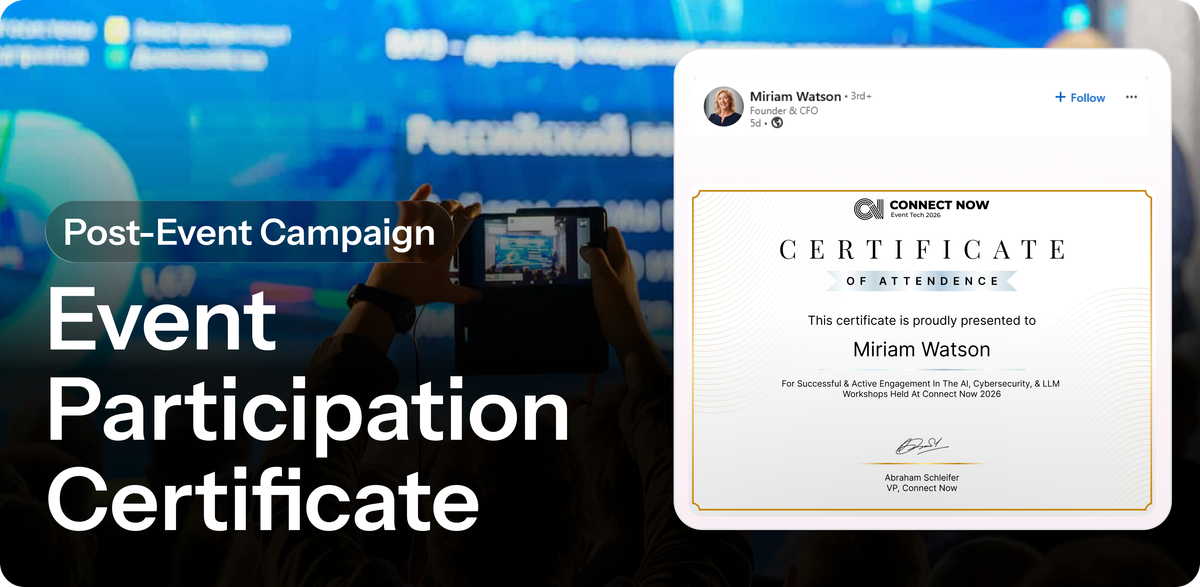
Events end on day three. But they don't have to. Most attendees leave with memories and business cards. Your event disappears from their feed the day doors close. But if you give them something to hold onto—a certificate, a badge, a moment of recognition—it becomes a keepsake worth sharing.
What is the Event Participation Certificate?
A premium, personalized certificate that acknowledges each attendee's participation. It turns attendance into a moment of recognition and a digital keepsake that extends your event's reach far beyond the closing session.
How does this help your event?
Certificates create a second wave of social sharing. Attendees feel celebrated. They want to share that moment—especially on LinkedIn where professional achievements matter. By delivering certificates during or immediately after the event, you give people a shareable asset they can post weeks later, keeping your event visible long after doors close.
The campaign is especially effective for:
- Professional events where attendees want proof of participation
- Training, workshops, or certification-adjacent events
- Events where attendee status or expertise matters
- Post-event engagement to keep attendees feeling valued
- Multi-event series (certificates from event 1 drive registrations for event 2)
How to build this on Premagic
Step 1: Design Your Certificate
Create a premium-looking certificate template that feels like an achievement:
- Include attendee name, event name, dates prominently
- Add event branding, colors, visual hierarchy
- Consider adding their role or category ("Attendee," "Speaker," "VIP Attendee")
- Design it to be LinkedIn-postable (vertical or square format)
Make it look like something worth framing and sharing—not a generic PDF.
Step 2: Set Up Personalization
In Premagic, configure the certificate to pull attendee data:
- Full name
- Company name
- Attendance dates
- Event name
- Optional: Session titles they attended (if you're tracking that)
The more personalized, the more shareable.
Step 3: Decide When to Deliver
Timing impacts sharing. Options:
- During the event: Display on screen during closing remarks or send via SMS same-day while attendees are still in "event mode"
- Day after: Email personalized certificates before momentum fades
- 1 week after: Once attendees have settled back into work (lower immediate impact but still timely)
Step 4: Add a Referral Link
Embed or attach a unique referral link within or alongside each certificate that points to next year's event registration. When attendees share their certificate and people click through, you track those clicks back to them via the Premagic dashboard.
Step 5: Enable One-Click Sharing
Provide:
- A pre-written LinkedIn caption with one-click share button
- Download option for the certificate (PNG/PDF)
- Email-to-friend option
Remove friction—the easier to share, the more people will.
Step 6: Create a Public Certificate Gallery
Display all certificates in a gallery on your event website or Premagic page. Show attendee name, company, and certificate. This becomes a social proof moment—people can see who attended and what they earned.
Key Features You're Using
Personalization: Each certificate is customized with their name, company, event details. Personalized assets get shared more than generic ones.
Referral Tracking: Include a unique link so you can track if their certificate share drives registrations for your next event.
Dashboard Metrics: Track how many certificates were shared, how many clicks each got, how many new registrations came from certificate shares.
Multiple Delivery Channels: Send via email, event app, or SMS. Display in your certificate gallery. The more ways people can access and share their certificate, the higher the sharing rate.
Pro Tips
Design Hierarchy: Make the attendee's name prominent. Event name should be visible. All other details subtle. The person should be the star of the certificate.
Same-Day Delivery: The closer to event close, the better. Share within 24 hours while attendees are still in "event mode."
Downloadable Format: Let attendees download their certificate as an image. They can use it in LinkedIn profiles, email signatures, or print it. Shareability increases when they have options.
Tiered Certificates: Create versions for different attendee types:
- "Speaker Certificate" for speakers (different design)
- "Sponsor Certificate" for sponsor team members
- "VIP Attendee Certificate" for premium ticket holders
- "First-Time Attendee Certificate" for newcomers
Throwback Strategy: Save all certificates in your photo gallery. Later (6-12 months), send throwback emails: "Remember when you attended [Event]? Register for [Next Event] and get this year's certificate." Use past certificates as registration drivers for future events.
Subscribe to Premagic Blog
Don't miss out on the latest news. Sign up now to get access to the library of members-only articles.