Personalized Speaker Posters | Pre-Event Campaign
Once your speakers are announced, don't just post a lineup graphic
Speaker lineups drive registrations. But most speakers see a generic media kit and never promote the event. You miss access to thousands of networks—people who would register if their favorite speaker invited them.
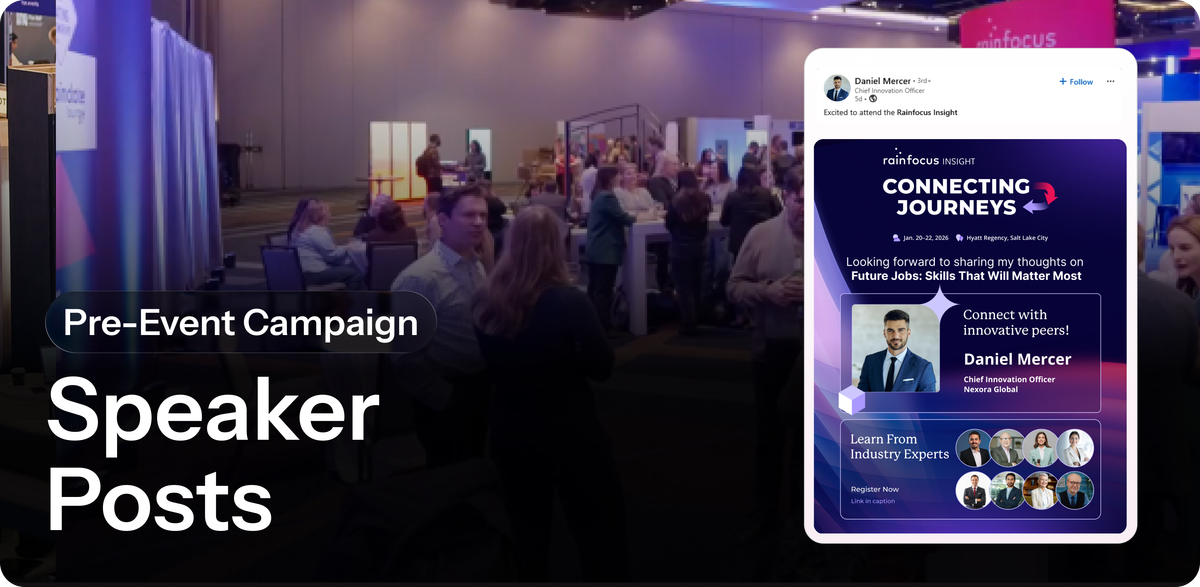
Personalized Speaker Posters. The day each speaker is announced, they get a ready-to-share post with their name, photo, and session details. Pre-written caption. One click to post. Their audience sees the announcement. You get access to every speaker's network without chasing them.
How does this help your event?
Speakers have highly engaged audiences. When they share they're speaking at your event, their followers pay attention. It's peer recommendation from someone they trust. But speakers won't promote unless it's frictionless—no work, no custom graphics to download, no thinking about what to say.
Personalized speaker posters remove friction. They arrive ready to share. Speakers post because it takes 5 seconds.
The campaign is especially effective for:
- Events with visible speaker lineups (conferences, industry summits, tech events)
- Shows where speaker credibility matters (professional development, training, thought leadership)
- Events trying to build buzz weeks before doors open
- Any event where reaching speaker networks is valuable
- Multi-day events where you can promote sessions over time, not just the overall event
How to build this on Premagic
Step 1: Upload Your Speaker List
Go to Premagic and create a new campaign. Select "Speaker" as your audience type. Upload your speaker list with:
- Full name
- Photo (headshot or speaker image)
- Company/title
- Session name and time (if applicable)
Step 2: Create Your Poster Template
Design a poster that highlights the speaker. Include:
- Speaker name and photo prominently
- Session title they're speaking on
- Event name and dates
- Call-to-action ("I'm speaking at [Event]")
- Event branding
Make it visually distinct so it stands out in social feeds.
Step 3: Generate AI Captions or Write Custom Copy
Use Premagic's AI caption feature to generate personalized copy for each speaker. Example:
"Excited to be speaking at [Event Name] on [Session Title]. 3 days of [Topic] insights starting [Date]. Register for my session →"
Or write one message that works for all speakers. The caption should invite their networks to attend—ideally their specific session.
Step 4: Add Referral Links
Attach a unique referral link to each speaker's poster. This link tracks every click and registration that came from their posts. You'll see which speakers drove the most registrations.
Step 5: Deploy to Speakers
Send each speaker their personalized poster via email with instructions: "Your session is confirmed. Share this post to your network."
Include:
- The poster (branded, ready to post)
- Pre-written caption (one-click copy)
- LinkedIn share button
- Download option for the image
Step 6: Monitor and Nudge
Track in your Premagic dashboard:
- Which speakers shared their poster
- How many clicks each post got
- How many registrations came from their shares
- Referrals per speaker
Send reminder emails to speakers who haven't posted yet. Example: "Your session is in 4 weeks. Share your poster to your network."
Step 7: Amplify Top Performers
Publicly recognize speakers who drove the most registrations. Thank them. Give them data: "Your post reached 5,000 people and brought in 120 registrations." Positive reinforcement encourages them to promote future events too.
Key Features You're Using
Speaker-Specific Campaign: Separate from attendee campaigns. Speakers have their own dashboards, their own reminder schedule, their own metrics.
Personalization: Each poster is customized with their name, photo, session details. A personalized post from a speaker is far more likely to be shared than a generic speaker lineup graphic.
Referral Link Tracking: Each speaker's poster carries their unique referral link. You see exactly how many registrations came from their specific posts.
Multiple Touchpoints: Deploy via email, confirmation emails, event app notifications. The more ways speakers see their poster, the more likely they'll share.
Dashboard Visibility: See advocacy rate (% of speakers who posted), referrals per speaker, which speakers drove the most registrations. Use this data to identify your top advocates.
Pro Tips
Early Announcement: The day a speaker confirms, they should get their personalized poster. The sooner they share, the earlier their audience sees your event.
Session-Specific Posts: If you have multiple sessions or tracks, create a poster for each speaker's specific session, not just the overall event. Speakers want to promote their own session, not just your event.
Weekly Reminders: Send speaker reminders every 1-2 weeks leading up to the event. "2 months until [Event]. Share your poster." Multiple touches increase share rates.
Video Teasers: If you have speaker videos or session previews, include them in reminder emails. Give speakers fresh assets to share, not just the same poster every week.
Track and Celebrate: Show speakers their impact. "Your post was seen by 8,000 people and brought in 145 registrations." Celebrate top performers publicly (if they're comfortable with it).
Different Speaker Tiers: Create different poster designs for keynote speakers vs. breakout speakers vs. panel participants. Make each feel special and distinct.
Subscribe to Premagic Blog
Don't miss out on the latest news. Sign up now to get access to the library of members-only articles.